All your platforms,
one route.
UniStops is a delivery assistant for drivers and delivery teams who carry parcels from several last-mile platforms at once. Bring every list into one app, deliver it as one combined route with a number on every parcel, and run your whole team's day — import, assign, dispatch and close — from the same place.
Free during early access · United States · English and Simplified Chinese
How it works
A team's morning, in three moves.
Built for teams that carry UniUni, GOFO and other platforms' parcels in the same van.
Import
The captain brings in the lists they have access to — files, pasted text, screenshots or a photo. Parcels are grouped by task or bag and matched to driver names.
Balance and number
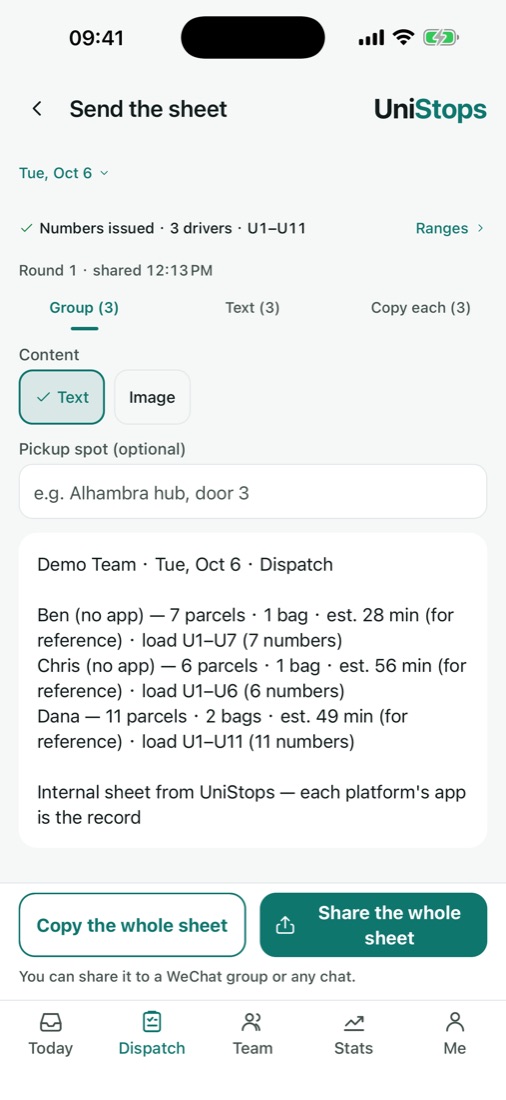
Split the work across today's drivers by hand or automatically. Every parcel gets its own load number, and each driver gets a dispatch sheet.
Load, deliver, close
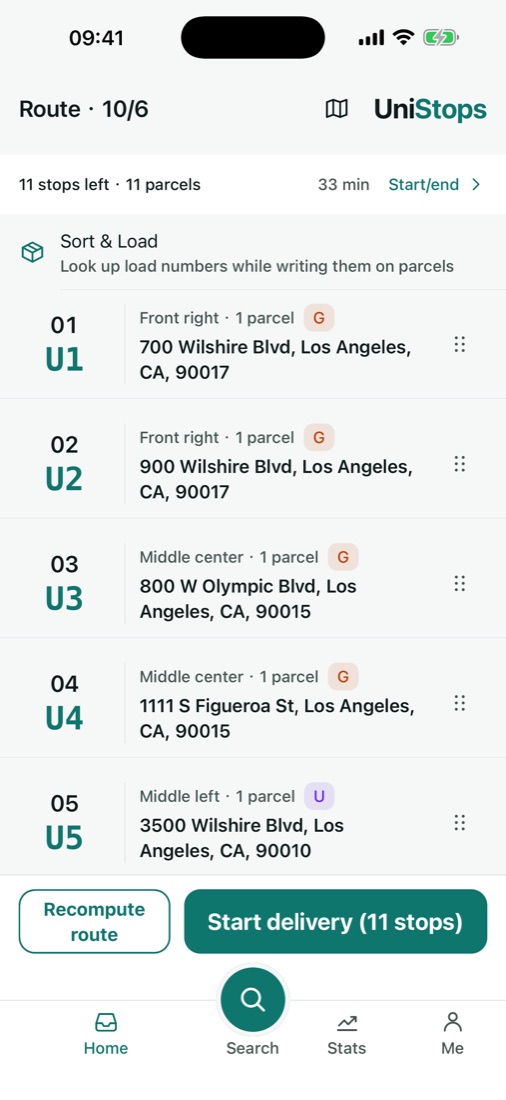
Drivers check parcels into the van and follow one optimized route across platforms; the captain closes the day with a saved snapshot.
For captains
Run the fleet's whole morning from your phone.
From import to day close, every step in one place — including drivers who don't use the app.
For drivers
Team tasks or your own parcels — one route either way.
Find the right box at every stop, keep working without signal, and confirm in each platform's own app.
Platforms
Every platform you deliver for. One route.
Today UniStops reads lists from these platforms, and more are on the way — tell us which one you need at ops@unistops.com.
UniStops is not affiliated with, sponsored or endorsed by UniUni, GOFO, SwiftX, SpeedX or Yanwen; their names are trademarks of their respective owners.
Privacy
Private by default.
Recipients
Recipient names and phone numbers stay on the driver's phone and are shown masked. Proof-of-delivery photos stay on the phone too.
Drivers
Location is used only while you are using the app. Team drivers choose whether their captain sees parcels they take on their own and the location recorded with a delivery.
Details in our privacy policy. You can delete your account in the app at any time.
FAQ
Questions
Is UniStops free?
Yes, during our early-access launch. Paid plans for captains and drivers will come later — we'll tell you in the app before anything changes, and you'll never be charged unless you choose to subscribe.
Do I need to give UniStops my platform password?
No. UniStops never signs in to any delivery platform. You import lists you already have, and you keep confirming deliveries in each platform's own app.
Do all my drivers need the app?
No. Captains can dispatch to drivers who don't use the app; they receive their sheet as text, an image or a text message.
Where is UniStops available?
In the United States, on Android now and on iPhone soon, in English and Simplified Chinese.
Can I use it without a team?
Yes. Independent drivers can import their own parcels and use the route, load numbers and day-end check on their own.
Put every platform on one route.
Free during early access. Questions, a platform we don't support yet, or a team that wants to try it: ops@unistops.com